

Missed approvals on AV rental orders don't just cause awkward conversations. They blow up budgets, delay load-ins, and put you in the position of defending decisions nobody formally signed off on. The client approval process for rental orders is one of the most overlooked pressure points in corporate event production, and most teams are still managing it with email threads and crossed fingers. This guide walks you through exactly how to build a repeatable, defensible approval workflow that keeps your rentals on track, your clients accountable, and your production team moving without unnecessary friction.
Table of Contents
- Understanding the client approval challenges in AV rental orders
- Preparing a streamlined approval workflow for rental orders
- Executing efficient client approvals during live event production
- Verifying approvals and preventing scope creep in rental orders
- Why traditional email approvals are holding back event production
- Streamline your client approvals with My Show Flow rental solutions
- Frequently asked questions
Key Takeaways
| Point | Details |
|---|---|
| Set clear dollar thresholds | Define who approves rental orders based on amount to streamline decision-making and avoid bottlenecks. |
| Use dedicated client portals | Replace email chains with branded portals that require no account creation for faster, clearer approvals. |
| Separate feedback from approval | Implement a binary approve or request changes system to prevent confusion and delays. |
| Verify identity and audit | Adopt workflows with identity verification and immutable logs to ensure compliance and legal validity. |
| Train approvers early | Educate department heads on mobile approval apps during prep week to boost timely approvals. |
Understanding the client approval challenges in AV rental orders
The first thing most event coordinators get wrong is treating client feedback as approval. A client replies to your rental order summary with "looks good, let's talk about the LED wall size" and you move forward. Three weeks later, they claim they never formally approved the order. That's not a client being difficult. That's a process failure.
The most common mistake is confusing feedback with approval, which leads directly to delays and scope creep. In AV production, where a single line item can represent $15,000 in LED panels or $8,000 in audio gear, that confusion is expensive.
Email compounds the problem. Most rental order approval workflows still run through inboxes, which creates three serious risks:
- No identity verification. Anyone with access to that inbox can click reply.
- No reliable audit trail. Threads get deleted, forwarded, or buried.
- No binary action. Email allows for ambiguous responses that feel like approval but aren't.
Email-based approval chains lack identity verification and audit trails, both of which are critical for compliance. If a dispute arises after the event, "they replied saying it looked good" is not a defensible position.
"The most common mistake is confusing feedback with approval, leading to delays and scope creep." This distinction matters enormously in AV rentals, where order changes after equipment is pulled from inventory cost real money.
Pro Tip: Create a single-sentence policy for your team: feedback is not approval. Every rental order requires a documented, timestamped sign-off through a designated channel before equipment is confirmed or pulled.
With these challenges identified, the next step is building a structured process that eliminates them before they surface on show day.
Preparing a streamlined approval workflow for rental orders
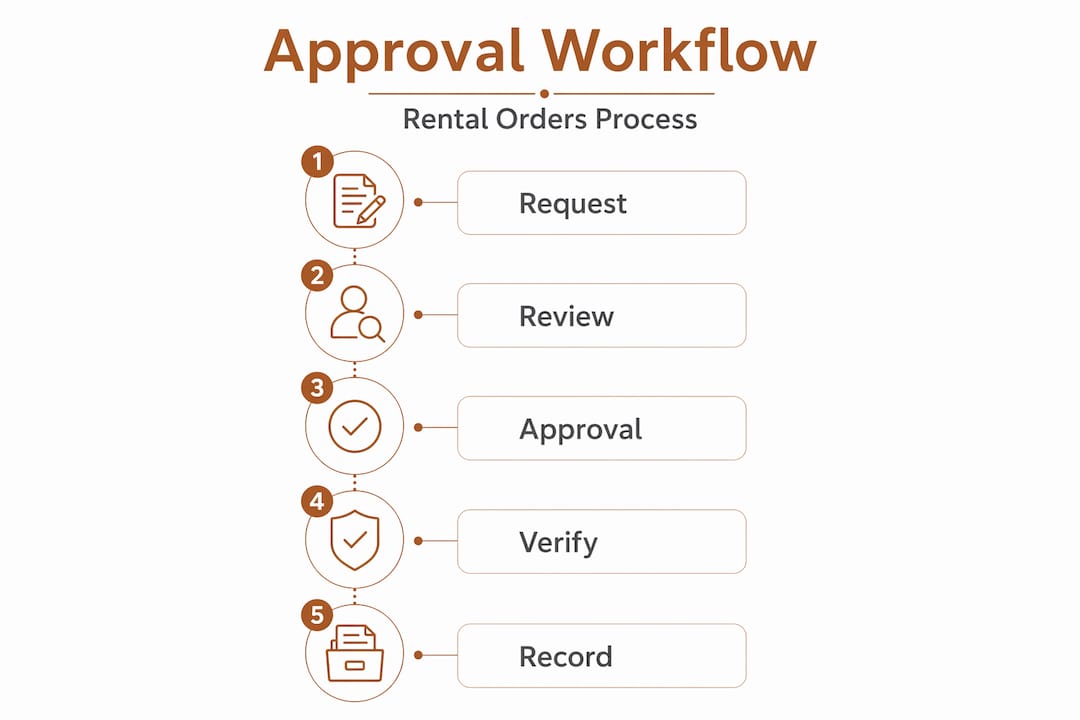
A repeatable client approval process doesn't happen by accident. It requires four things set up before any order goes out: clear approval thresholds, defined timelines, assigned roles, and the right rental management solutions to support the workflow.
Here's how to build it:
-
Set dollar-based approval thresholds. Not every rental order needs the same level of sign-off. Define thresholds such as department head approval for orders under $500, a unit production manager for orders under $5,000, and producer-level approval for anything above that. This keeps small decisions moving fast without exposing large spend to single-point risk.
-
Assign named approvers for each project. Ambiguity about who approves what is a major bottleneck. Before a project kicks off, document the approver at each threshold level and confirm their contact details and preferred review method.
-
Set explicit response timelines. Allow 3 business days for standard content approvals and 5 business days for design or milestone approvals before a default approval is assumed. Put this in your contract language upfront, not as a surprise when the deadline hits.
-
Use a digital portal with binary actions. Give clients a single place to approve or request changes. No reply-all email chains. No phone calls that go undocumented. A portal with approve and request changes buttons forces clarity.
-
Train approvers before production begins. This is the step most coordinators skip. If your client's department head doesn't know how to use your approval portal, they'll default to email, and you're back to square one.
| Approval level | Spend threshold | Response window |
|---|---|---|
| Department head | Under $500 | 2 business days |
| Unit production manager | $500 to $5,000 | 3 business days |
| Producer or executive | Over $5,000 | 5 business days |
| Emergency rental add-on | Any amount | 4 hours (on-site) |
Pro Tip: When setting up approval workflows, include a short screen-recorded walkthrough (under 2 minutes) showing clients exactly how to use your approval portal. Send it with the first order. Adoption rates improve dramatically.
Having prepared the workflow parameters, it's time to execute the approval steps effectively during live event production.
Executing efficient client approvals during live event production
Preparation sets the stage. Execution is where most approval processes fall apart, because production timelines compress and the temptation to skip steps gets real.
Here's how to run the approval process cleanly during active production:
-
Issue tasks in manageable batches. Don't send a client a 47-line rental order and ask for a single approval. Break orders into logical groups: audio, video, lighting, staging. Smaller batches get reviewed faster and produce more specific feedback when changes are needed.
-
Use a branded portal that requires no account creation. Clients who have to create a login to approve a rental order will delay. Use a portal that authenticates via a secure link so the friction is near zero. Package every deliverable as a task with a binary approve or request changes action to reduce confusion.
-
Capture approvals with timestamps. Every approval action should log the date, time, and identity of the approver. This is your paper trail if anything is disputed after the event.
-
Automate reminders. If a client hasn't responded within 24 hours of a deadline, your system should send an automatic reminder, not your coordinator manually following up. Configuring end-to-end workflows that reduce manual data entry and approval delays is one of the highest-return investments in client order management.
Key behaviors to build into your execution process:
- Never pull equipment from inventory without a confirmed, timestamped approval
- Log every change request with the original version attached for comparison
- Flag any approval that comes in after the order cutoff for immediate escalation
- Keep a running approval status dashboard visible to your production team in real time
Pro Tip: For multi-day corporate events, schedule approval checkpoints at 72 hours before load-in, 24 hours before load-in, and on the morning of show day. Each checkpoint covers a specific category of rentals so nothing gets missed in the final push.
With execution underway, verifying approvals and avoiding costly errors is essential for quality control.
Verifying approvals and preventing scope creep in rental orders
Approvals that can't be verified aren't worth much. This is where the difference between a professional client approval process and a casual one becomes most visible, especially when disputes arise.
The three pillars of approval verification in AV rental orders are identity, matching, and contract language.
Identity verification means your system confirms who approved the order, not just that someone clicked a button. Automated workflows with identity verification create immutable audit trails that are necessary for compliance and dispute resolution. If a client later claims they didn't approve a $12,000 LED wall upgrade, you have a timestamped, identity-verified record that says otherwise.

Three-way matching is the gold standard for rental agreement validation. Match the purchase order, delivery ticket, and invoice to prevent overpayment and catch discrepancies before they become billing disputes. In AV production, where last-minute add-ons are common, this process also catches unauthorized equipment that was added to an order without going through the approval workflow.
Contract clauses with feedback deadlines are your protection against scope creep. Include a proceed clause in your statement of work stating that if client feedback is not received within the defined window, the current version is considered approved and the timeline will not be extended.
| Verification method | What it protects against | Best tool type |
|---|---|---|
| Identity verification | Unauthorized approvals | Digital portal with auth |
| Timestamped audit log | Disputed approvals | Automated workflow platform |
| Three-way PO matching | Billing errors and overcharges | Integrated PO and invoice system |
| Proceed clause | Scope creep and timeline drift | Contract language and SOW |
Key verification checkpoints to build into every rental order cycle:
- Confirm approver identity at the time of sign-off, not just email address
- Run three-way matching before releasing final invoices
- Archive all approval records in a project folder accessible to your team
- Review audit logs after each event to identify any gaps in the process
Understanding verification safeguards completes the core process. Now for a perspective that most production guides won't give you.
Why traditional email approvals are holding back event production
Here's the uncomfortable truth: most production companies know their email-based approval process is broken. They just haven't felt enough pain yet to fix it.
Email approvals lack identity verification and audit trails, which creates real liability and compliance risk. But beyond the legal exposure, email approvals are slow in a way that compounds. A coordinator sends an order summary. The client reads it on their phone, thinks "I'll respond later," and later becomes two days before load-in. By then, inventory has shifted, pricing may have changed, and your team is scrambling.
Mobile-first approval tools with push notifications solve this problem directly. When a client gets a push notification with a single approve button, the approval happens in under 30 seconds. When they get an email with a PDF attached, it happens whenever they get around to it.
The harder problem is cultural. Department heads often ignore email instructions entirely, which means training on mobile apps during the prep phase isn't optional, it's the only thing that actually works. You can build the most elegant approval portal in the world, but if your client's operations director has never seen it before show week, you'll end up with a phone call at 11pm asking what they're supposed to do.
The companies winning at modern approval best practices treat client onboarding into their approval tools as part of the production kickoff, not an afterthought. They schedule a 15-minute walkthrough in the first production meeting. They send the test approval before any real orders go out. And they enforce the process consistently, which means not accepting email approvals even when a client insists on it.
The shift from email to structured digital approvals isn't just a technology upgrade. It's a statement about how seriously you take accuracy, accountability, and your client's time.
Streamline your client approvals with My Show Flow rental solutions
Getting your approval process right requires more than good intentions. It requires tools built for the specific demands of AV rental production, not adapted from generic project management software.
My Show Flow rental management solutions give event coordinators and production managers a purpose-built platform for handling every stage of the rental order approval workflow. From mobile approvals with push notifications that speed up client sign-offs, to integrated purchase order and budget tracking that keeps rental spend visible in real time, the platform is designed around how live event teams actually work. Three-way PO matching, real-time audit trails, and automated reminders eliminate the manual follow-up that slows most approval cycles down. If your current process still runs through email threads and spreadsheets, it's worth seeing what a production-native workflow looks like.
Frequently asked questions
What is the optimal client approval timeline for AV rental orders?
Best practices recommend allowing 3 business days for standard content approvals and up to 5 business days for design or milestone approvals before default approval is assumed. Build these windows into your contract language from the start.
How can I ensure client approvals are legally verifiable and compliant?
Automated workflows with identity verification create immutable audit trails that make approvals secure, compliant, and legally defensible in a way that email-based methods simply cannot match.
What approval thresholds should I set for rental order spend?
A tiered approach works well: department head approval for orders under $500, unit production manager for orders under $5,000, and producer-level sign-off for anything above that threshold, balancing speed with appropriate oversight.
How do I prevent scope creep during the rental approval process?
Include a proceed clause in your SOW stating that if client feedback is not received within 5 business days, the current version is considered approved and the project timeline will not be adjusted to accommodate late responses.
Why is training on approval tools important for event coordinators?
Because department heads won't read email instructions, and without hands-on training during prep, approvers default to whatever is most familiar, which is usually email, and the structured workflow breaks down immediately.